
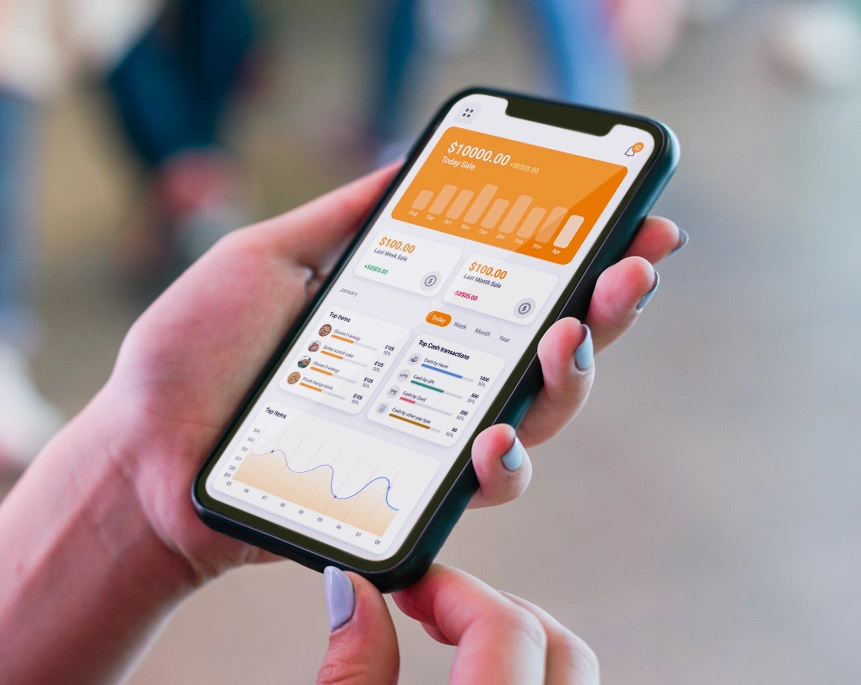
How do retailers manage multiple store branches?
Retailers manage multiple store branches by connecting every location to one centralized retail management system. Instead of checking separate registers, spreadsheets, and staff schedules at each outlet, a central dashboard pulls live sales, inventory, and staff data from all branches into a single view. This lets a retailer compare branch performance, move stock between locations, and manage staff shifts without visiting each store in person.
That single sentence answers the question, but the real work is in how that centralized setup actually functions day to day. Here’s what it looks like in practice.
The problem with running stores on separate systems
Most retailers don’t plan to end up with five different systems for five stores. It happens gradually. One branch opens with a basic POS. A second branch gets added with a slightly newer setup. A third store inherits whatever the previous owner was using. Within a couple of years, the business is stitched together with spreadsheets, WhatsApp updates, and end-of-day phone calls.
The market data backs this up. Retail management software spending is growing quickly precisely because multi-store operations have become harder to run manually as businesses expand. And the operational pain is measurable: research on multi-location businesses found that a large share of them are still using disconnected tools for each site, and managers routinely lose hours a week just reconciling numbers across locations rather than making decisions with them (via industry multi-location statistics).
The result is a familiar set of headaches:
- Sales visibility gaps: the owner doesn’t know which branch is performing well until the month-end report lands.
- Stock imbalances: one outlet is overstocked on a product while another has been out of it for a week.
- Staff scheduling confusion: shift swaps, attendance, and payroll are tracked differently at every branch.
- Inconsistent pricing and promotions: a discount runs at one store but not another, confusing customers and staff alike.
A centralized dashboard exists to remove exactly these gaps by giving every store the same source of truth.
What “managing from one dashboard” actually means
A true multi-store retail management setup isn’t just multiple POS terminals reporting into a shared spreadsheet at the end of the day. It means real-time, two-way visibility: what happens at the counter in one branch is instantly reflected in the dashboard the owner or manager sees, from any device.
Here’s how that plays out across the three areas that matter most.
1. Sales: One view, every branch
Instead of pulling separate reports from each store, a manager can open a single dashboard and see:
- Real-time sales totals per branch, product, and staff member
- Which locations are trending up or down against targets
- Best and worst-selling items store by store, so purchasing decisions are based on actual demand rather than guesswork
- Consolidated end-of-day reconciliation, so closing five stores takes minutes instead of five separate phone calls
This is also where centralized reporting pays off beyond convenience. Retailers using unified, cloud-based platforms across channels and locations have reported meaningfully higher customer retention and faster order fulfillment compared to retailers still running disconnected, single-location setups.
2. Staff: Centralized rosters, local flexibility
Multi-store staff management usually breaks down in one of two ways: either every branch manager runs HR their own way, or head office tries to micromanage every shift from a distance, and it becomes unworkable.
A centralized system solves this by keeping structure at the top while leaving day-to-day flexibility at branch level:
- One login for the owner or area manager to view attendance, shifts, and performance across every branch
- Branch managers can still adjust their own local schedules without needing head-office approval for routine changes
- Role-based access, so cashiers, branch managers, and the business owner each see only what’s relevant to them
- Commission and incentive tracking that stays consistent across locations, instead of every branch calculating it differently
This matters more than it might seem. Multi-location businesses that lack centralized tools consistently report staffing consistency as one of their biggest operational struggles, and scheduling-related issues are a top driver of customer complaints in these businesses (source: industry statistics).
3. Stock: Real-time inventory, movable between branches
Stock is usually where multi-store retailers feel the most pain, and where a shared dashboard delivers the clearest win.
With centralized inventory management, a retailer can:
- See real-time stock levels across every branch from one screen
- Transfer stock between branches directly through the system, rather than manually driving inventory between stores
- Set low-stock alerts per branch, so no single location silently runs out of a bestseller
- Track shrinkage and stock discrepancies by branch, making it easier to spot where losses are happening
This is a widely documented problem in retail. Industry inventory research points to enormous global losses each year from stockouts and overstocks combined, a gap that mostly stems from not having a real-time, shared view of stock across locations (see 2026 inventory statistics). Retailers who’ve struggled with this exact issue may also find it useful to read our detailed breakdown of why retail inventory tracking is so hard and how to fix it.
Why a single dashboard changes decision-making, not just reporting
The real shift isn’t just “less manual work.” It’s that decisions get made faster and with better information.
When an owner can see, in real time, that one branch is low on a product another branch has in excess, that’s a same-day stock transfer instead of a lost sale. When staffing data across branches sits in one place, it’s easier to spot which location is understaffed during peak hours before it becomes a customer complaint. When sales data is consolidated, expansion decisions (which product line to push, which branch is ready for a second location) are based on actual numbers rather than instinct.
This is also why choosing the right POS software for a growing, multi-branch business matters more as a retailer scales past one location. A solution that works fine for a single store can become a genuine liability once there are three, four, or ten branches to manage.
What to look for in multi-store retail management software
If a retailer is evaluating options, a few capabilities separate systems that genuinely support multi-branch growth from ones that will need to be replaced in a year or two:
- Centralized dashboard with branch-level drill-down: not just totals, but the ability to click into any single branch’s detail.
- Cloud-based access: the owner shouldn’t need to be physically present at a branch to see what’s happening there.
- Inter-branch stock transfer built into the system: not a manual, off-platform workaround.
- Role-based staff access: branch managers, cashiers, and owners each need different views and permissions.
- Consistent pricing and promotion control: the ability to push a discount to all branches, or just specific ones, from one place.
- Consolidated financial reporting: daily, weekly, and monthly summaries across all locations without manual merging.
LithosPOS’s multi-store management features are built around exactly this: one dashboard, real-time sync across branches, and the ability to manage sales, staff, and stock without needing separate tools per store.
Frequently Asked Questions
How do retailers manage multiple store branches? By using a centralized retail management system that connects every branch’s sales, staff, and inventory data to a single dashboard, so decisions can be made in real time instead of relying on end-of-day reports from each store.
What is multi-store retail management software? It’s a system that lets a retailer with more than one physical location control sales tracking, staff scheduling, and stock levels across all branches from one central platform, instead of running each store on a separate, disconnected system.
Can stock be transferred between branches automatically? Most modern multi-store systems allow stock transfer requests to be raised, approved, and tracked directly within the platform, so inventory can move between branches without manual reconciliation afterward.
Do all branches need to use the same pricing? No. A centralized system typically allows a retailer to set uniform pricing across all branches, or apply branch-specific pricing and promotions, depending on local demand.
How does centralized staff management work across multiple stores? Owners or area managers get one login to view attendance, shifts, and performance for every branch, while individual branch managers retain control over day-to-day scheduling for their own location.
Is cloud-based multi-store management secure? Reputable cloud-based retail platforms use role-based access control and encrypted data storage, so only authorized staff can view or edit sensitive sales, staff, or financial data, regardless of which branch they’re logged in from.
What’s the biggest challenge in managing multiple retail branches? Inventory visibility is usually the biggest challenge. Without a shared, real-time view of stock across branches, retailers commonly end up with overstock at one location and stockouts at another.
How many branches does a retailer need before centralized management becomes necessary? Even with two branches, manually reconciling sales and stock becomes time-consuming. Most retailers find centralized management essential once they cross three or more locations.
Ready to run every branch from one screen? Book a free demo and see how LithosPOS brings your sales, staff, and stock together.