Categories
Retail POS

Open a New Store in Days, Not Months: The Centralized POS Setup Guide

Opening a new store should feel like a milestone, not a fire drill. Yet for most growing retail chains, the weeks before launch are the most stressful part of the entire expansion. Staff have to rebuild menus. They re-enter item catalogs by hand. They re-train the team on a new system and double-check pricing across every register. By the time the doors open, the team is exhausted. Small errors have already crept into the stock count.

The good news: most of this pain is avoidable. It rarely comes from the physical build-out. It comes from setting up store operations the slow way, one system at a time, instead of using a centralized POS setup that lets a new location inherit everything the business has already built.

Why Store Opening Speed Matters More Than Ever

Retail expansion is picking back up. According to a Telsey Advisory Group report covered by Retail Dive, net store openings in the US grew only modestly in fiscal 2025. Analysts project the pace will roughly double in 2026, led by off-price, beauty, and discount retailers. Chains that open reliably and repeatedly are the ones capturing that growth. Boot Barn, for instance, is targeting 65 to 70 new stores in fiscal 2026 after opening 60 in fiscal 2025, according to CRE Daily. That pace only works when the back-end setup for each new location is fast and repeatable.

The lesson for independent retailers and small chains is the same. Speed to open is now a competitive advantage, not just an operational nice-to-have.

What “Centralized POS Setup” Actually Means

A centralized setup keeps your entire product catalog, pricing rules, tax settings, staff roles, and loyalty program in one place. Every store location pulls from that single source instead of starting from scratch.

Instead of manually re-entering thousands of items at a new branch, a manager can add the new store in a few clicks and instantly replicate the existing catalog to it. LithosPOS’s multi-store features build around exactly this idea. Add a new store location, replicate the items instantly, and the branch goes live faster instead of waiting days for someone to rebuild the menu or shelf list by hand.

This single change removes the biggest bottleneck in most new store launches: data entry.

The Centralized Setup Checklist for a Faster Launch

1. Set Up the Store Profile First

Before anything else, create the store’s profile inside your account: address, tax rules, operating hours, and currency if it differs from your other branches. LithosPOS’s store settings guide walks through adding a new store using the same steps you used for your first location, so you don’t reinvent the process.

2. Replicate the Item Catalog, Don’t Rebuild It

This is where most of the time savings come from. Rather than typing in every product, price, and category again, pull the existing catalog into the new store. Adjust only what’s genuinely different, such as local pricing or a region-specific item.

3. Assign Warehouses and Stock Levels

New locations need their own inventory tracking from day one. Set up the warehouse for the new store so you can track stock movements, purchase orders, and transfers from the very first sale. LithosPOS’s warehouse management setup keeps inventory control consistent across every branch, including the newest one.

4. Set Staff Roles and Permissions in Bulk

Instead of building a staff hierarchy from scratch, clone role templates from an existing store and adjust employee assignments. This keeps access levels consistent and avoids security gaps during a chaotic opening week.

5. Connect Reporting Before You Go Live, Not After

Once you create the store, it should immediately appear in your combined reporting dashboard alongside every other branch. This lets owners spot slow sales days or stock issues in the new location right away, instead of waiting weeks for a manual report.

6. Test Offline Mode Before Opening Day

Internet drops happen, especially during a new store’s first few weeks while the team is still finalizing network setup. A POS solution that keeps working offline, then syncs sales once the connection returns, protects the store from downtime during its most important days.

The Payoff: What Centralized Setup Saves You

  • Time: New stores can go from signed lease to first sale in days rather than weeks, since the catalog, pricing, and staff structure already exist.
  • Accuracy: Replicating data instead of re-entering it removes the pricing mismatches and missing items that usually show up in a store’s first month.
  • Visibility: Owners get real-time performance data on the new store from day one instead of flying blind during the critical opening period.
  • Consistency: Customers get the same pricing, promotions, and loyalty experience whether they’re at the original store or the newest branch.

This same principle scales with the business. LithosPOS’s multi-store retail management approach connects every branch’s sales, staff, and inventory data to a single dashboard. A chain with five stores or fifty can run on the same amount of daily effort.

Frequently Asked Questions

How long does it take to set up a new store with centralized POS software? With a centralized setup, most retailers can configure a new store and go live within a few days. The exact timeline depends on how much local customization you need, but the core catalog, pricing, and staff structure carry over instantly instead of requiring a rebuild.

Do I need to re-enter my product catalog for every new store? No. A centralized POS solution lets you replicate your existing item catalog to a new store location in a few clicks. You only need to adjust items that are genuinely different, like region-specific pricing.

Can a new store location work if the internet isn’t fully set up yet? Yes, as long as the POS software supports offline mode. Sales continue uninterrupted and sync automatically once the connection comes back, which matters most during a new store’s first few weeks.

Will reports from the new store show up with my other locations automatically? Yes. Add a new store under a centralized account, and its sales, inventory, and staff data feed into the same combined dashboard you use for every other branch, so owners can compare performance from day one.

What’s the biggest reason new store openings get delayed? Manual data entry is usually the biggest bottleneck, particularly rebuilding the item catalog, pricing, and staff permissions from scratch for each new location. Centralizing this data removes most of that delay.

Categories
Retail POS

Multi-Store Retail Management: How to Control Sales, Staff, and Stock from One Dashboard

How do retailers manage multiple store branches?

Retailers manage multiple store branches by connecting every location to one centralized retail management system. Instead of checking separate registers, spreadsheets, and staff schedules at each outlet, a central dashboard pulls live sales, inventory, and staff data from all branches into a single view. This lets a retailer compare branch performance, move stock between locations, and manage staff shifts without visiting each store in person.

That single sentence answers the question, but the real work is in how that centralized setup actually functions day to day. Here’s what it looks like in practice.

The problem with running stores on separate systems

Most retailers don’t plan to end up with five different systems for five stores. It happens gradually. One branch opens with a basic POS. A second branch gets added with a slightly newer setup. A third store inherits whatever the previous owner was using. Within a couple of years, the business is stitched together with spreadsheets, WhatsApp updates, and end-of-day phone calls.

The market data backs this up. Retail management software spending is growing quickly precisely because multi-store operations have become harder to run manually as businesses expand. And the operational pain is measurable: research on multi-location businesses found that a large share of them are still using disconnected tools for each site, and managers routinely lose hours a week just reconciling numbers across locations rather than making decisions with them (via SchedulingKit’s 2026 multi-location statistics).

The result is a familiar set of headaches:

  • Sales visibility gaps: the owner doesn’t know which branch is performing well until the month-end report lands.
  • Stock imbalances: one outlet is overstocked on a product while another has been out of it for a week.
  • Staff scheduling confusion: shift swaps, attendance, and payroll are tracked differently at every branch.
  • Inconsistent pricing and promotions: a discount runs at one store but not another, confusing customers and staff alike.

A centralized dashboard exists to remove exactly these gaps by giving every store the same source of truth.

What “managing from one dashboard” actually means

A true multi-store retail management setup isn’t just multiple POS terminals reporting into a shared spreadsheet at the end of the day. It means real-time, two-way visibility: what happens at the counter in one branch is instantly reflected in the dashboard the owner or manager sees, from any device.

Here’s how that plays out across the three areas that matter most.

1. Sales: One view, every branch

Instead of pulling separate reports from each store, a manager can open a single dashboard and see:

  • Real-time sales totals per branch, product, and staff member
  • Which locations are trending up or down against targets
  • Best and worst-selling items store by store, so purchasing decisions are based on actual demand rather than guesswork
  • Consolidated end-of-day reconciliation, so closing five stores takes minutes instead of five separate phone calls

This is also where centralized reporting pays off beyond convenience. Retailers using unified, cloud-based platforms across channels and locations have reported meaningfully higher customer retention and faster order fulfillment compared to retailers still running disconnected, single-location setups.

2. Staff: Centralized rosters, local flexibility

Multi-store staff management usually breaks down in one of two ways: either every branch manager runs HR their own way, or head office tries to micromanage every shift from a distance, and it becomes unworkable.

A centralized system solves this by keeping structure at the top while leaving day-to-day flexibility at branch level:

  • One login for the owner or area manager to view attendance, shifts, and performance across every branch
  • Branch managers can still adjust their own local schedules without needing head-office approval for routine changes
  • Role-based access, so cashiers, branch managers, and the business owner each see only what’s relevant to them
  • Commission and incentive tracking that stays consistent across locations, instead of every branch calculating it differently

This matters more than it might seem. Multi-location businesses that lack centralized tools consistently report staffing consistency as one of their biggest operational struggles, and scheduling-related issues are a top driver of customer complaints in these businesses (source: SchedulingKit).

3. Stock: Real-time inventory, movable between branches

Stock is usually where multi-store retailers feel the most pain, and where a shared dashboard delivers the clearest win.

With centralized inventory management, a retailer can:

  • See real-time stock levels across every branch from one screen
  • Transfer stock between branches directly through the system, rather than manually driving inventory between stores
  • Set low-stock alerts per branch, so no single location silently runs out of a bestseller
  • Track shrinkage and stock discrepancies by branch, making it easier to spot where losses are happening

This is a widely documented problem in retail. Industry inventory research points to enormous global losses each year from stockouts and overstocks combined, a gap that mostly stems from not having a real-time, shared view of stock across locations (see Good’s Order Inventory System’s 2026 inventory statistics). Retailers who’ve struggled with this exact issue may also find it useful to read our detailed breakdown of why retail inventory tracking is so hard and how to fix it.

Why a single dashboard changes decision-making, not just reporting

The real shift isn’t just “less manual work.” It’s that decisions get made faster and with better information.

When an owner can see, in real time, that one branch is low on a product another branch has in excess, that’s a same-day stock transfer instead of a lost sale. When staffing data across branches sits in one place, it’s easier to spot which location is understaffed during peak hours before it becomes a customer complaint. When sales data is consolidated, expansion decisions (which product line to push, which branch is ready for a second location) are based on actual numbers rather than instinct.

This is also why choosing the right POS software for a growing, multi-branch business matters more as a retailer scales past one location. A solution that works fine for a single store can become a genuine liability once there are three, four, or ten branches to manage.

What to look for in multi-store retail management software

If a retailer is evaluating options, a few capabilities separate systems that genuinely support multi-branch growth from ones that will need to be replaced in a year or two:

  1. Centralized dashboard with branch-level drill-down: not just totals, but the ability to click into any single branch’s detail.
  2. Cloud-based access: the owner shouldn’t need to be physically present at a branch to see what’s happening there.
  3. Inter-branch stock transfer built into the system: not a manual, off-platform workaround.
  4. Role-based staff access: branch managers, cashiers, and owners each need different views and permissions.
  5. Consistent pricing and promotion control: the ability to push a discount to all branches, or just specific ones, from one place.
  6. Consolidated financial reporting: daily, weekly, and monthly summaries across all locations without manual merging.

LithosPOS’s multi-store management features are built around exactly this: one dashboard, real-time sync across branches, and the ability to manage sales, staff, and stock without needing separate tools per store.

Frequently Asked Questions

How do retailers manage multiple store branches? By using a centralized retail management system that connects every branch’s sales, staff, and inventory data to a single dashboard, so decisions can be made in real time instead of relying on end-of-day reports from each store.

What is multi-store retail management software? It’s a system that lets a retailer with more than one physical location control sales tracking, staff scheduling, and stock levels across all branches from one central platform, instead of running each store on a separate, disconnected system.

Can stock be transferred between branches automatically? Most modern multi-store systems allow stock transfer requests to be raised, approved, and tracked directly within the platform, so inventory can move between branches without manual reconciliation afterward.

Do all branches need to use the same pricing? No. A centralized system typically allows a retailer to set uniform pricing across all branches, or apply branch-specific pricing and promotions, depending on local demand.

How does centralized staff management work across multiple stores? Owners or area managers get one login to view attendance, shifts, and performance for every branch, while individual branch managers retain control over day-to-day scheduling for their own location.

Is cloud-based multi-store management secure? Reputable cloud-based retail platforms use role-based access control and encrypted data storage, so only authorized staff can view or edit sensitive sales, staff, or financial data, regardless of which branch they’re logged in from.

What’s the biggest challenge in managing multiple retail branches? Inventory visibility is usually the biggest challenge. Without a shared, real-time view of stock across branches, retailers commonly end up with overstock at one location and stockouts at another.

How many branches does a retailer need before centralized management becomes necessary? Even with two branches, manually reconciling sales and stock becomes time-consuming. Most retailers find centralized management essential once they cross three or more locations.

Ready to run every branch from one screen? Book a free demo and see how LithosPOS brings your sales, staff, and stock together.

Categories
Retail POS

Why Manual Inventory Fails in Apparel Stores with Many Sizes and Colors

Manual inventory fails in apparel stores because every product has multiple variations, such as size, color, style, brand, and season. When these details are tracked on paper or spreadsheets, stock counts become outdated quickly. Apparel POS software helps by tracking each variant separately, updating stock after every sale, managing barcode billing, showing low-stock alerts, and giving accurate reports across branches.

Running an apparel store looks simple from the outside. A customer walks in, chooses a shirt, tries a size, picks a color, and pays at the counter. But behind that simple sale, inventory management is much more complex.

Unlike many retail businesses, fashion and apparel stores do not deal with single products only. One shirt may come in five sizes, six colors, and different styles. One pair of jeans may have waist sizes, length options, fits,s and washes. A boutique may sell seasonal collections where stock changes every few weeks.

This is why manual inventory often fails in apparel stores. Paper records, Excel sheets, ts and basic billing tools may work when the store is small. But as products, variants, and customers increase, manual tracking becomes slow, inaccurate, and difficult to control. Research from Auburn University, cited in Avery Dennison’s analysis of inventory accuracy, found that apparel retailers using traditional inventory methods average only around 65% inventory accuracy, a gap that technology-driven tracking can close significantly.

For apparel retailers, inventory accuracy is not just a backend task. It directly affects sales, customer experience, purchasing decisions, and profit margin.

Why Apparel Inventory Is Harder Than Normal Retail Inventory

Apparel inventory is different because one product can have many versions.

For example, a basic T-shirt may have:

  • 5 sizes: XS, S, M, L, XL
  • 4 colors: black, white, blue, green
  • 2 fits: regular and slim

That single product can quickly become 40 separate stock combinations. If the store owner tracks only “T-shirt” as one item, they will not know which size or color is actually available.

This creates common problems:

  • Staff may say an item is available when the required size is out of stock
  • Fast-moving colors may finish without notice
  • Slow-moving sizes may remain unsold for months
  • Reordering becomes guesswork
  • Branch transfers become confusing
  • Sales reports do not show the real demand pattern

This is where apparel POS software becomes important. It helps fashion stores track each product variation separately instead of treating all stock as one general item, using a proper inventory management system rather than a single running total.

The Biggest Problems With Manual Inventory in Apparel Stores

1. Size and Color Mismatch

The most common inventory issue in apparel stores is size and color mismatch.

A store may have 20 pieces of a dress in total, but that number does not help if customers mostly ask for medium size in black. Manual inventory may show that stock is available, but staff may later discover that only unpopular sizes or colors are left.

This leads to lost sales. A customer who cannot find the right size may not wait for restocking. They may buy from another store. With proper clothing store inventory management, each size and color can be tracked individually, so store owners can see exactly how many pieces are available for every variation.

2. Excel Sheets Become Outdated Quickly

Many apparel stores start with spreadsheets because they are simple and free. But Excel depends on manual updates. Every sale, exchange, return, purchase and stock transfer must be entered correctly.

In a busy fashion store, this is difficult to maintain. If staff forget to update a sale, the sheet becomes inaccurate. If two people edit different versions of the file, the stock data becomes confusing. If returns are not entered properly, reports become unreliable.

Excel can store data, but it does not automatically update inventory after billing. Apparel POS software updates stock in real time whenever an item is sold, returned, or transferred.

3. Staff Waste Time Searching for Stock

When inventory is not properly organized, staff spend too much time checking shelves, trial rooms, store rooms, and other branches.

This affects customer experience. A customer asking for a specific size expects a quick answer. If staff take too long to confirm availability, the customer may lose interest. Manual inventory also puts pressure on experienced staff, since new employees may not know where items are kept or which products are available in another branch.

A clothing store POS software can help staff search for items by name, barcode, size, color, category, or branch. This makes service faster and reduces dependency on memory.

4. Dead Stock Is Not Noticed Early

Dead stock is a serious problem in fashion retail. Apparel items lose value when trends change, seasons end or new collections arrive.

Manual inventory usually tells store owners how much stock they have, but not always how fast each item is moving. A store owner may realize too late that certain colors, sizes or styles are not selling, and by then the store may need heavy discounts to clear old stock.

Fashion inventory management software helps identify slow-moving items earlier so store owners can take action before stock goes dead. Useful actions include running limited-time discounts, moving stock to a better-performing branch, creating combo offers, avoiding repeat purchase of slow-moving styles, and promoting old stock before new arrivals.

5. Reordering Becomes Guesswork

In apparel retail, reordering should not be based only on total sales. Store owners need to know exactly which sizes and colors are selling.

For example, if blue shirts sell well only in medium and large sizes, reordering all sizes equally may create overstock in XS and XXL. This blocks cash and storage space. Manual records often do not give this level of detail, so store owners may buy too much of the wrong stock and too little of the right stock.

Apparel POS software helps retailers make smarter purchase decisions by showing sales trends by size, color, item, category and branch.

6. Multi-Branch Stock Becomes Difficult to Control

Manual inventory becomes even harder when a fashion business has more than one outlet.

A product may be out of stock in one branch but available in another. Without centralized inventory, staff may not know this, and the business may lose sales even when the item exists somewhere else. Multi-branch apparel stores also need to manage stock transfers carefully. If items are moved from one branch to another without proper tracking, both branches may show wrong stock numbers.

A POS software with multi-store inventory helps store owners view stock across branches and manage transfers with better control.

7. Returns and Exchanges Create Confusion

Fashion stores handle more exchanges than many other retail businesses. Customers may return an item because of size, fit, color or personal preference.

If returns are managed manually, inventory can become inaccurate. Staff may forget to add the item back to stock, enter the wrong size, or miss the original bill details, which creates problems in both stock management and customer service.

A good apparel POS software records sales, returns and exchanges properly, and helps staff check the original purchase and update inventory correctly.

8. Barcode Mistakes Slow Down Billing

Manual item selection at the billing counter can lead to wrong product entries, especially when many products look similar. For example, two shirts may have the same design but different sizes or colors. If staff choose the wrong item manually, inventory reports become incorrect even though the customer paid correctly.

Barcode billing reduces this problem. Each product variation can have a unique barcode, so the exact size, color and item is billed correctly. Barcode inventory software for apparel stores helps improve checkout speed and stock accuracy at the same time.

How Apparel POS Software Solves Manual Inventory Problems

Apparel POS software helps fashion stores move from guesswork to real-time stock control. Instead of depending on notebooks or spreadsheets, every sale and stock movement is recorded inside one connected POS software.

Important features include:

  • Variant-level inventory for size, color and style
  • Barcode generation and barcode billing
  • Real-time stock updates after each sale
  • Low-stock alerts for fast-moving items
  • Purchase and supplier tracking
  • Stock transfer between branches
  • Return and exchange tracking
  • Sales reports by product, category, size and color
  • Discount and seasonal sale management
  • Customer purchase history and loyalty tracking

These features help store owners understand what is really happening inside the business.

How LithosPOS Helps Fashion and Apparel Stores

LithosPOS helps fashion and apparel stores manage billing, inventory, discounts and multi-store operations from one POS software. For apparel retailers dealing with many sizes, colors and variants, LithosPOS makes it easier to track stock accurately. Store owners can manage product variations, generate barcodes, speed up checkout, apply discounts and view sales and inventory reports.

LithosPOS also supports multi-store control, which helps fashion retailers manage stock across branches without depending on separate files or manual updates. You can explore the full fashion and apparel POS software page for a closer look at how it works, or start a free trial directly.

Signs Your Apparel Store Has Outgrown Manual Inventory

Your store may need apparel POS software if:

  • Staff often cannot find the right size or color
  • Stock shown in records does not match actual stock
  • You depend on Excel for daily inventory updates
  • Old collections remain unsold for too long
  • You do not know which sizes sell best
  • Branch transfers are hard to track
  • Returns and exchanges create stock confusion
  • Billing staff manually search items during checkout
  • You reorder based on guesswork instead of reports

If these problems happen regularly, manual inventory is already limiting growth.

Key Takeaways

Manual inventory fails in apparel stores because fashion products have too many variations. Size, color, style, brand, season and branch-level stock cannot be managed accurately with paper records or basic spreadsheets.

Apparel POS software helps solve this by tracking every product variation, updating inventory in real time, supporting barcode billing and giving better sales reports. For fashion and apparel stores, better inventory control means fewer missed sales, less dead stock, faster checkout and smarter purchasing decisions.

FAQ

1. Why does manual inventory fail in apparel stores? Manual inventory fails because apparel products have many variations such as size, color, style and fit. When these are tracked manually, stock records become outdated quickly and store owners lose visibility into what is actually available.

2. What is apparel POS software? Apparel POS software is a retail POS solution designed to manage billing, inventory, variants, barcodes, discounts, returns and reports for fashion and clothing stores.

3. How does apparel POS software manage sizes and colors? Apparel POS software allows each product to be created with variants such as size, color and style. This helps the store track exact stock for every product combination instead of only tracking total quantity.

4. Is Excel enough for clothing store inventory management? Excel may work for very small stores, but it becomes difficult when the store has many products, sizes, colors, returns and branches. Excel does not automatically update stock after each sale unless everything is entered manually.

5. How does barcode billing help apparel stores? Barcode billing helps apparel stores scan the exact product variation during checkout. This reduces billing mistakes, improves checkout speed and keeps inventory records more accurate.

6. Can apparel POS software reduce dead stock? Yes. Apparel POS software can show slow-moving items, best-selling products, and stock aging. This helps store owners run discounts, transfer stock, or avoid buying too many of the items that do not sell.

7. Is apparel POS software useful for multi-branch fashion stores? Yes. Multi-branch fashion stores can use apparel POS software to view stock across outlets, transfer inventory, compare branch sales, and manage purchasing from one place.

Stop losing sales because of wrong stock counts, missing sizes, and manual inventory mistakes. Manage billing, variants, barcodes, discounts, and multi-store stock with LithosPOS apparel POS software. Start your 14-day free trial.

Categories
Restaurant POS Retail POS

How to Compare POS Systems Before Buying: The Complete Evaluation Guide

Not all POS systems are built the same, and the wrong choice can cost you thousands.

This guide covers every criterion you need to evaluate before committing to a point-of-sale system, from real-time inventory and payment processing to hidden fees, hardware lock-in, and multi-location scalability.

In this guide

  1. What is a POS system, and why does your choice matter?
  2. Cloud POS vs on-premise POS: which is right for you?
  3. The 8 must-evaluate criteria before buying
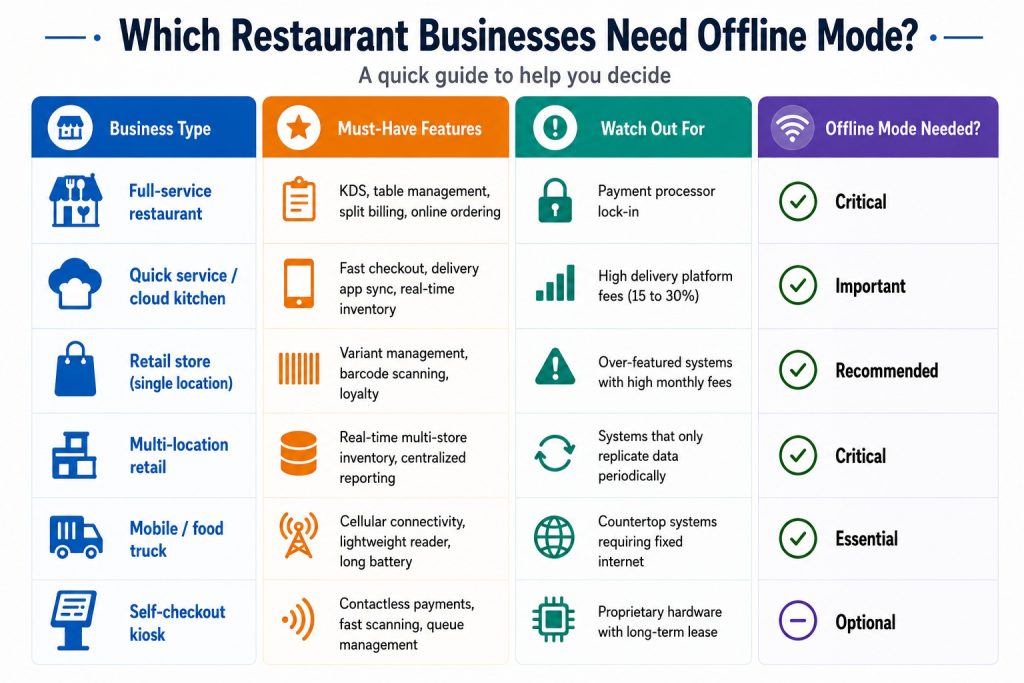
  4. Quick comparison table: what to look for by business type
  5. Red flags to watch out for
  6. Your pre-purchase evaluation checklist
  7. Frequently asked questions

What is a POS system, and why does your choice matter?

point-of-sale (POS) system is the central hub of your business operations. It processes transactions, tracks inventory, manages staff, generates reports, and connects your physical store to your online presence. In 2026, the best POS systems go far beyond just ringing up a sale.

The wrong POS system can lock you into high payment processing fees, limit your ability to scale, and cause operational chaos during peak hours. The right one pays for itself through better inventory control, faster checkout, and smarter business decisions. According to Statista, the global POS software market is projected to surpass $29 billion by 2028, reflecting how central these systems have become to modern retail and hospitality.

Cloud POS vs on-premise POS: which is right for you?

Before you compare specific systems, you need to decide on the architecture that fits your business. The two main types are cloud-based and on-premise POS. Each has real tradeoffs depending on your location, budget, and operational needs. Forbes Advisor consistently highlights cloud POS as the preferred choice for growing businesses due to its flexibility and lower upfront cost.

  • Cloud-based POS – Hosted online. Access anywhere. Auto-updates. Lower upfront cost. Ideal for multi-location businesses and remote monitoring.
  • On-premise POS – Installed locally. Higher upfront investment. Works offline without internet dependency. Better for high-security data environments.

Quick rule: If you have multiple locations or want to monitor sales remotely, cloud POS wins every time. LithosPOS is fully cloud-based and operates across 40+ countries with real-time sync. If you are in an area with unreliable internet, look for a system with a reliable offline mode.

The 8 must-evaluate criteria before buying any POS system

1. Real-time inventory management

Your POS must sync stock levels instantly across all locations, with sub-10-second updates during high-volume periods. Look for automated reorder triggers, SKU variant support, and multi-location dashboards. A system that only syncs periodically will cause overselling and stockouts. LithosPOS restaurant POS and retail POS both include real-time inventory tracking built into the core platform.

Ask vendors: Does your inventory update in real time across all registers and locations simultaneously, including during offline mode?

2. Payment processing flexibility

Some POS systems lock you into their own payment processor. On $50,000/month in card sales, this can cost you an extra $3,200 to $5,000 per year compared to choosing your own interchange-plus processor. Always ask whether you can bring your own merchant services provider. The PCI Security Standards Council recommends verifying your processor is fully PCI-DSS compliant before committing.

3. Hardware compatibility and cost

Avoid non-cancellable hardware leases. A $500 terminal on a 48-month lease can cost over $2,300 total. Look for systems that support industry-standard hardware (iPad, Android tablets, Sunmi/PAX terminals) or can reprogram your existing devices. Always buy hardware outright when possible. Check the LithosPOS pricing page to understand what hardware options are available with each plan.

4. Industry-specific features

Restaurant POS systems need table management, kitchen display systems (KDS), split billing, and online ordering. Retail POS systems need variant management (size/color/SKU), e-commerce sync, and loyalty programs. Never use a retail POS for a high-volume restaurant as the workflows are completely different and you will end up building costly workarounds.

5. Offline mode reliability

Even in 2026, internet outages happen. A reliable POS must queue transactions locally to a durable, journaled store that survives device restarts, not just in-memory. Verify that the system can process transactions for at least 4 to 8 hours offline and reconcile automatically when reconnected. Investopedia notes that offline capability is one of the most overlooked criteria during the POS evaluation process.

6. Reporting and AI-driven analytics

Modern POS systems now offer predictive inventory suggestions, staff performance analytics, and demand forecasting. Look for systems that tell you what you are going to sell, not just what you sold. This is now the fastest-growing area in retail and restaurant tech, with Gartner identifying AI-powered analytics as a top priority for operations leaders in 2026.

7. Third-party software compatibility

Your POS should not be an island. It must connect to your accounting software (QuickBooksXero), payroll tools, CRM, marketing platforms, and e-commerce stores. Verify every connection is native before signing any contract. LithosPOS supports a wide range of third-party tools out of the box.

8. Total cost of ownership (not just the monthly fee)

Beyond the software subscription, calculate menu/inventory upload fees, PCI compliance charges, hardware shipping, payment processing rates, and support tier costs. A system with a higher monthly fee but lower transaction rates often saves more money at scale. Review the LithosPOS pricing page for a transparent breakdown with no hidden fees.

Hidden costs to ask about: Setup fees, data migration charges, per-location pricing, transaction minimums, and contract cancellation penalties.

Quick comparison: what to prioritize by business type

Red flags to watch out for when comparing POS vendors

🛑 Unannounced in-person sales visits with “today only” pricing pressure

🛑 Rate quotes below 1.0% flat, as hidden fees almost always apply

🛑 Non-cancellable equipment leases (48-month leases are the worst deal in the industry)

🛑 No references from businesses in your industry with similar volume

🛑 Inventory that syncs “periodically” instead of in real time

🛑 Support teams are in the wrong time zone for your operating hours

Your pre-purchase POS evaluation checklist

✅ Define your must-have features before booking any demo

✅ Request a full cost breakdown: software, hardware, processing, and support

✅ Ask for a live demo of offline mode, not a slide deck explanation

✅ Test inventory sync speed across locations during a demo transaction

✅ Verify all promised connections are native, not middleware-dependent

✅ Ask for references from similar-sized businesses in your vertical

✅ Review the contract cancellation terms before signing anything

✅ Calculate your effective processing rate at your actual monthly volume

✅ Confirm data migration support is included, not a paid add-on

✅ Check PCI compliance tools are included in the plan, not separately billed

Ready to run through this checklist with a real system? Book a LithosPOS demo and we will walk you through every criterion live.

Frequently asked questions

1. What is the most important factor when choosing a POS system? Payment processing cost. Your POS is permanently tied to a payment processor that takes a cut of every single sale. A system with great features but locked-in high processing rates will cost you far more over time than a simpler system with flexible, competitive pricing. Before anything else, calculate your effective processing rate at your actual monthly card volume and compare it across vendors.

2. What is the difference between cloud POS and traditional POS? A cloud POS stores your data online and lets you access it from any device, anywhere. It updates automatically, has a lower upfront cost, and is ideal for businesses with multiple locations or remote monitoring needs. A traditional (on-premise) POS stores data locally on your own server, giving you full control and offline reliability but requiring a higher setup investment and in-house IT maintenance. For most modern businesses, cloud POS is the smarter long-term choice.

3. How much does a POS system cost per month? It depends on what your business needs. Basic POS software starts free for entry-level plans and scales to $40 to $400 per month for systems with inventory management, multi-location support, and advanced reporting. On top of that, factor in payment processing fees (typically 2.5 to 2.9% per transaction) and hardware costs. Always calculate the total cost of ownership, not just the software subscription fee.

4. Can a POS system work without internet? Yes, but not all systems handle it equally well. A reliable POS must queue transactions locally to a durable store that survives device restarts and auto-reconcile everything when the internet returns. Some systems marketed as offline capable only hold data in memory, meaning a reboot during an outage wipes your transaction queue. Always test offline mode live during your demo before committing.

5. What POS system is best for restaurants vs retail? They need completely different feature sets. A restaurant POS needs table management, kitchen display systems (KDS), split billing, course-by-course ordering, and delivery app sync. A retail POS needs SKU and variant management (size, color, style), barcode scanning, multi-location inventory, and e-commerce channel sync. Never use a generic or cross-purpose system for either as the workflow mismatch will create costly operational workarounds.

6. How do I avoid hidden fees when buying a POS system? Always ask for a full cost breakdown beyond the advertised software fee. Key things to ask about: menu or inventory upload fees, PCI compliance charges, hardware shipping costs, data migration fees, per-location pricing, and contract cancellation penalties. Then calculate your effective processing rate at your real monthly card volume, not the base rate shown in marketing materials. A legitimate vendor will give you all of this upfront without pressure.

Categories
Restaurant POS Retail POS

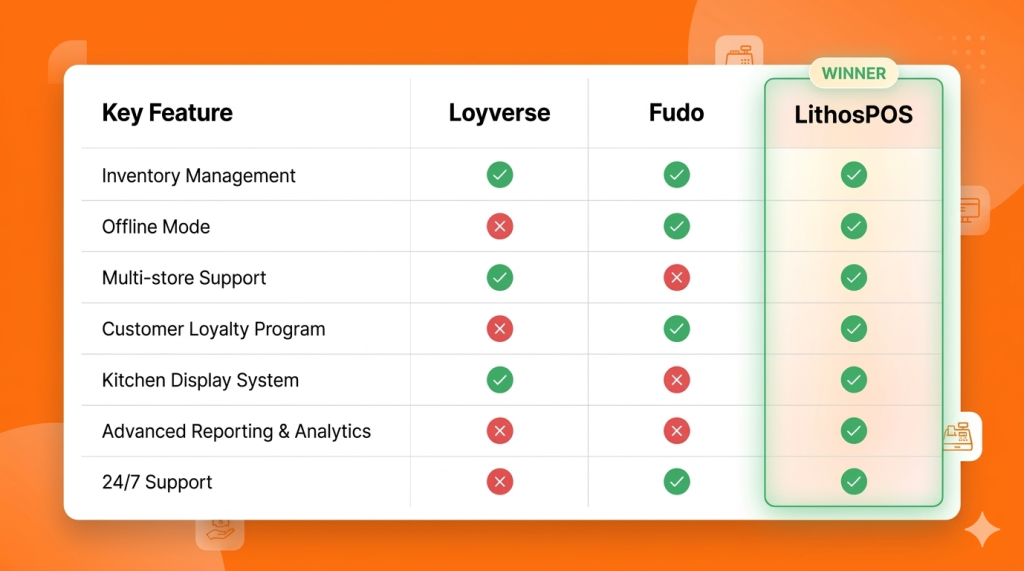
Loyverse vs Fudo vs LithosPOS: Which is the Best POS software for your Business in 2026?

Choosing the wrong Point of Sale (POS) software can cost you thousands of dollars in lost inventory, compliance fines, and customers frustrated by slow checkout lines. If you’re reading this, you are likely looking for an alternative to Loyverse, evaluating Fudo, or dealing with outdated, clunky legacy systems.

In 2026, a POS software is no longer just a “cash register.” It is the financial engine of your business. It must handle multiple locations effortlessly, continue processing sales even without the internet, and integrate seamlessly with your accounting and e-commerce platforms.

In this definitive guide, we compare Loyverse, Fudo, and LithosPOS to help you make the right choice for your retail store or restaurant.

The Hidden Cost of “Free” POS software

Many business owners start with freemium applications like Loyverse. It’s free to start and easy to download on an iPad. However, as your business grows and you open a second or third location, you hit a glass ceiling:

  • The Integration Nightmare: Global freemium solutions rarely offer deep, native integrations with local accounting systems or electronic invoicing mandates. You end up paying for expensive third-party connectors like Zapier or entering data manually.
  • Non-Existent VIP Support: When your system crashes on a busy Friday night, you cannot rely on a community forum or an email ticket that takes 48 hours to resolve. You need immediate human help.
  • Lack of True “Offline Mode”: If the internet drops, your business stops. Basic systems won’t let you print kitchen tickets or close secure payments offline. A true offline POS is essential.

POS software Comparison Matrix (2026)

This table summarizes the key differences between the top POS alternatives.

Deep Dive: Which software should you choose?

1. Loyverse: Best for Hobbyists and Pop-ups

The Verdict: Loyverse is an excellent global freemium POS for one-person businesses, mobile coffee carts, or temporary pop-up shops. However, it lacks vital B2B features like advanced matrix inventory and real-time enterprise support.

  • The Best Part: It is free to start, and the interface is very user-friendly.
  • The Catch: “Free” becomes expensive when you need real accounting integrations, warehouse management for 3+ locations, or emergency phone support.

2. Fudo: Strong in Restaurants, Weak in Multi-Store Retail

The Verdict: Fudo is a specialized management software for gastronomy. It is a solid choice if you only operate a single, small restaurant.

  • The Best Part: The interface is designed specifically for restaurant workflows (tables, waiters, kitchen routing).
  • The Catch: If your business is mixed (e.g., a bakery that also sells packaged retail goods), Fudo falls short in matrix inventory management and warehouse transfers. It is not built to scale complex retail operations.

3. LithosPOS: The Growth Engine for Scaling Businesses

The Verdict: LithosPOS is the ultimate comprehensive POS system for scaling businesses in 2026. It combines a modern, sleek cloud interface with a powerful multi-store engine and a true “Offline Mode.”

  • Unbreakable Offline Mode: Unlike the competition, if your internet provider fails, LithosPOS keeps billing, printing kitchen tickets, and securely storing data to sync automatically when the connection returns. You never lose a sale. Learn more about our offline POS capabilities.
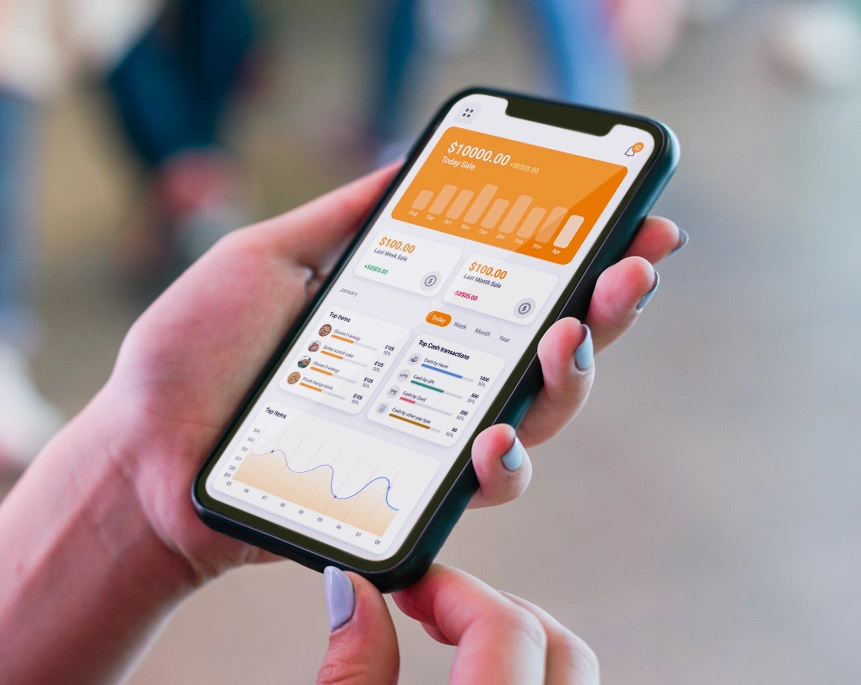
  • Total Multi-Store Control: Whether you have 2 or 50 locations, LithosPOS lets you view real-time inventory across all stores, execute stock transfers, and analyze centralized reports right from your phone using the Smart Dashboard app.
  • Limitless Integrations: With over 50+ payment gateways, accounting integrations (QuickBooks, SAP, OracleERP), and e-commerce syncing, LithosPOS fits perfectly into your existing tech stack.
  • Support That Understands Your Business: When your POS is the heart of your operation, you need experts available 24/7, not a help forum.

Conclusion:

When is it time to migrate to LithosPOS?

If your business is losing sales due to slow software, you are bleeding money from inventory shrinkage (“employee theft”) due to poor stock tracking, or you are stressed about accounting and invoicing compliance… it is time to leave free apps and legacy software behind.

LithosPOS is built for small business owners who demand frictionless growth, total inventory control, and operational peace of mind.

Ready to scale your business in 2026? Don’t just take our word for it. Speak with one of our implementation experts and discover exactly how LithosPOS can automate your operations today.

Book a Free Demo and Talk to an Advisor Today

Categories
Customer experience Restaurant Restaurant POS Retail Retail POS

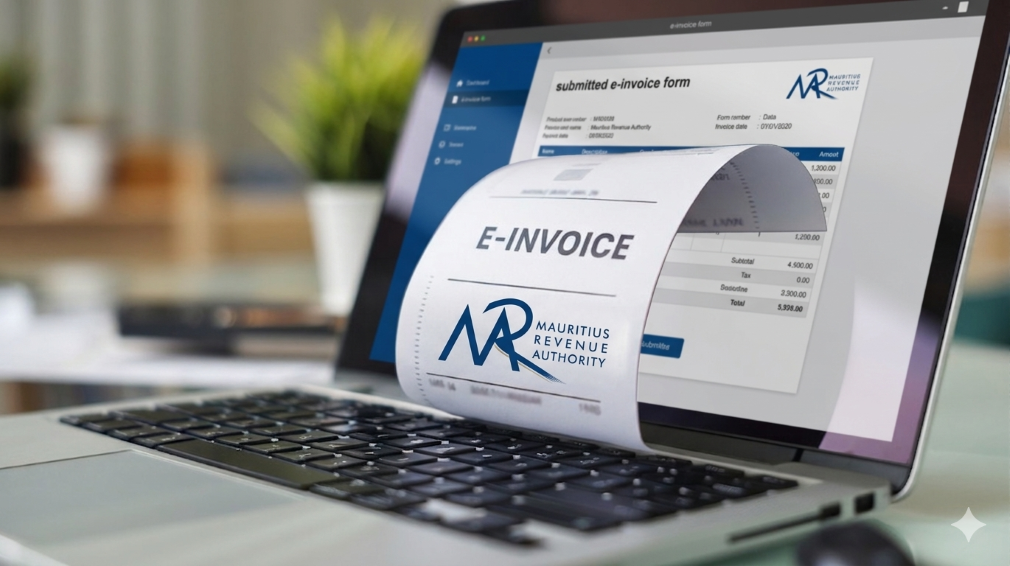
How LithosPOS Supports MRA-Compliant Invoicing for Businesses in Mauritius

In Mauritius, businesses operate within a well-defined regulatory framework that promotes transparency, accuracy, and accountability in financial transactions. The Mauritius Revenue Authority (MRA) plays a central role in shaping this environment by setting clear invoicing and VAT guidelines that businesses must follow.

Rather than viewing compliance as a burden, many businesses today see it as a structured system that supports better financial management. With the help of modern POS software like LithosPOS, aligning with MRA invoicing standards becomes a seamless part of everyday operations.

The Importance of MRA’s Invoicing Framework

The invoicing standards established by MRA are designed to bring consistency and clarity across all business transactions in Mauritius. These guidelines ensure that every invoice contains the necessary fiscal details required for proper tax reporting and verification.

A standard MRA-compliant invoice typically includes:

  • Registered business details
  • VAT registration number
  • Unique and sequential invoice number
  • Date and time of transaction
  • Itemized list of goods or services
  • Applicable VAT rates and amounts
  • Final payable amount

This structured approach helps businesses maintain uniformity in documentation while making tax reporting more accurate and reliable.

Aligning Daily Operations with Compliance

For many businesses, the challenge is not understanding MRA requirements but consistently applying them across every transaction. Manual invoicing or disconnected systems can lead to inconsistencies, missing data, or calculation errors.

LithosPOS addresses this by embedding compliance directly into the billing process. Instead of requiring additional effort, the system ensures that every invoice generated already follows the expected format and structure.

This alignment allows businesses to maintain compliance without disrupting their daily workflow.

How LithosPOS Supports MRA-Compliant Invoicing

LithosPOS is designed to support businesses operating in regulated environments like Mauritius by incorporating essential invoicing standards into its core functionality.

Each invoice generated through LithosPOS is structured to include:

  • Complete business identification details
  • Accurate VAT registration information
  • System-generated sequential invoice numbering
  • Clear item-level breakdowns
  • Correct VAT calculations
  • Transparent totals

By ensuring that these elements are automatically included, LithosPOS reduces the need for manual checks and helps maintain consistency across all transactions.

Accurate VAT Handling Made Simple

VAT accuracy is a key component of MRA compliance. Even small miscalculations can lead to discrepancies in reporting, which may affect tax submissions and financial records.

LithosPOS simplifies VAT management by:

  • Applying predefined VAT rates to products and services
  • Supporting both VAT-inclusive and VAT-exclusive pricing
  • Automatically calculating VAT amounts during billing
  • Generating clear VAT breakdowns on invoices

This ensures that businesses can rely on consistent and accurate tax calculations while maintaining transparency in every transaction.

Automation That Enhances Consistency

One of the key advantages of using POS software like LithosPOS is automation. When invoicing is automated, businesses can eliminate many of the common errors associated with manual processes.

LithosPOS helps maintain consistency by:

  • Standardizing invoice formats across all transactions
  • Ensuring continuous and sequential invoice numbering
  • Reducing dependency on manual data entry
  • Maintaining uniformity across multiple outlets or locations

This level of consistency aligns closely with MRA’s objective of creating a reliable and traceable invoicing system for all businesses.

Supporting Audit Readiness with Organized Data

MRA’s compliance framework also emphasizes the importance of maintaining clear and accessible financial records. During audits or reviews, businesses are expected to provide accurate transaction histories and supporting documents.

LithosPOS supports this requirement by:

  • Storing all transaction data securely
  • Allowing quick retrieval of past invoices
  • Generating detailed sales and VAT reports
  • Maintaining a clear audit trail for every transaction

With organized records readily available, businesses can approach audits with confidence and minimal disruption.

A Structured Approach to Business Growth

Compliance is not just about meeting regulatory requirements; it also contributes to stronger business operations. A well-structured invoicing system improves internal processes, reduces disputes, and builds trust with customers and stakeholders.

By aligning with MRA standards through LithosPOS, businesses can:

  • Improve financial accuracy
  • Maintain consistent documentation
  • Strengthen reporting capabilities
  • Prepare for future regulatory updates

This creates a stable foundation that supports long-term growth and scalability.

Bridging Compliance and Technology

The combination of MRA’s structured guidelines and LithosPOS’s automated capabilities creates a balanced system that makes compliance easier to manage.

Instead of handling compliance as a separate responsibility, businesses can integrate it into their everyday operations. LithosPOS acts as a bridge between regulatory requirements and practical business needs, ensuring that invoicing remains accurate, consistent, and aligned.

Conclusion

MRA’s invoicing standards are designed to create a transparent and reliable business environment in Mauritius. When supported by the right technology, these standards become easier to implement and maintain.

POS software like LithosPOS helps businesses align naturally with MRA requirements by automating invoicing, ensuring VAT accuracy, and maintaining organized records. This approach allows businesses to stay compliant while focusing on operational efficiency and growth.

From retail stores and supermarkets to restaurants, cafés, and service-based businesses, LithosPOS supports consistent and structured invoicing across all business types.

Book a demo today and explore how POS software like LithosPOS can support your business with structured, MRA-aligned invoicing and smarter operations.

Categories
Branding Customer experience Restaurant Restaurant POS Retail Retail POS

POS Software in 2026: The Silent Manager Powering Retail & Restaurants

In 2026, retail and restaurant businesses will no longer be run only by owners, managers, or supervisors. A major part of daily decision-making now happens quietly in the background, powered by POS software. What was once limited to billing has evolved into a silent manager that oversees operations, reduces errors, and keeps businesses running smoothly without constant human intervention.

This shift isn’t about replacing people. It’s about enabling smarter, faster, and more consistent operations in an increasingly complex business environment.

The Evolution of POS Software Beyond Billing

Traditional POS tools focused on one job: completing transactions. But modern POS software in 2026 has expanded far beyond that role. It now monitors inventory movement, tracks sales patterns, highlights inefficiencies, and ensures accuracy across every transaction.

For retail stores and restaurants handling high volumes, multiple staff members, and varied payment methods, this evolution is no longer optional. POS software acts as a central control system, silently coordinating tasks that once required manual supervision.

The Rise of the “Silent Manager”

A silent manager doesn’t give instructions or demand attention. Instead, it works continuously in the background, ensuring operations stay aligned.

In retail and restaurant environments, POS software now:

  • Automatically updates inventory after every sale
  • Ensures price consistency across products and locations
  • Tracks peak hours and sales trends
  • Flags discrepancies without disrupting workflow
  • Maintains accurate records for reporting and compliance

This behind-the-scenes automation reduces the dependency on constant oversight and minimizes the risk of human error.

Why Accuracy Matters More Than Ever in 2026

Customer expectations in 2026 are shaped by speed and reliability. A delayed bill, incorrect price, or missing item can damage trust instantly.

POS software plays a critical role in maintaining accuracy by:

  • Syncing product prices in real time
  • Preventing manual billing mistakes
  • Ensuring stock levels reflect actual availability
  • Reducing mismatches between sales and inventory

For restaurants, this accuracy extends to kitchen orders, table management, and payment reconciliation. For retail stores, it ensures smoother checkouts and better stock planning.

Data That Works Quietly but Powerfully

One of the most underrated aspects of modern POS software is how it handles data. Instead of overwhelming business owners with complex dashboards, POS solutions in 2026 simplify insights.

Sales reports, inventory summaries, and performance metrics are generated automatically and ready when needed. This allows owners to:

  • Identify best-selling items
  • Understand slow-moving stock
  • Plan purchases more efficiently
  • Make informed decisions without guesswork

This form of business intelligence works silently, but its impact is significant.

Offline Reliability Still Matters

Despite advances in connectivity, uninterrupted internet access isn’t guaranteed everywhere. That’s why offline-capable POS software remains highly relevant in 2026.

A reliable POS solution continues to:

  • Process sales without the internet
  • Store transaction data securely
  • Sync automatically once connectivity is restored

This ensures business continuity and protects revenue, especially for stores and restaurants operating in high-traffic or remote locations.

Reducing Operational Stress for Business Owners

Managing a retail store or restaurant often means juggling staff, suppliers, customers, and finances. POS software reduces this burden by handling repetitive operational tasks.

Instead of manually checking stock, reviewing registers, or reconciling sales, business owners can rely on their POS software to maintain order. This shift allows them to focus more on growth, customer experience, and strategy.

POS Software as a Growth Enabler

In 2026, POS software isn’t just a tool; it’s a foundation for scalable growth. Whether managing one store or multiple locations, modern POS solutions support expansion by:

  • Centralizing operations
  • Standardizing processes
  • Providing unified reporting
  • Ensuring consistency across outlets

This silent management layer makes growth more predictable and less chaotic.

The Future Is Quiet, Smart, and Efficient

The most powerful changes in business operations often go unnoticed. POS software in 2026 doesn’t demand attention, yet it plays a crucial role in keeping retail and restaurant businesses efficient, accurate, and resilient.

By quietly managing data, transactions, and workflows, POS software allows businesses to operate with confidence without micromanagement or constant firefighting.

In the years ahead, success won’t depend on working harder, but on working smarter. And for many businesses, that smart work is already happening silently right at the point of sale.

If you want to make your business run smoothly with fewer errors and better control, try POS software like LithosPOS and experience smarter operations every day. Get a free trial today.

Categories
Customer experience Restaurant Restaurant POS Retail Retail POS

Do You Really Know How Your Business Is Performing?

Running a retail store or restaurant is not just about making sales. It is about understanding what is actually happening behind those numbers. Many business owners feel confident when the cash counter looks busy or the store is crowded. But does that really mean your business is performing well?

The truth is, without clear data and meaningful insights, it is easy to miss what is working, what is not, and where money is silently leaking. This is where business analytics and reporting become essential.

Why Feeling Busy Is Not the Same as Performing Well

A common mistake among small and growing businesses is relying on gut feeling. You may feel that sales are increasing, inventory is under control, or staff performance is fine.

But unless you are tracking the right metrics, these assumptions can be misleading.

For example:

  • Are profits growing, or is it just sales volume?
  • Are certain products selling well while others remain unsold?
  • Are peak hours being fully utilised?
  • Are billing errors affecting revenue?

Without proper reporting, these questions remain unanswered.

What Does Business Performance Really Mean?

Business performance goes beyond daily sales totals. It includes:

  • Sales trends across days, weeks, and months
  • Product and category performance
  • Inventory movement and stock ageing
  • Payment method breakdown
  • Staff efficiency and error tracking
  • Peak hours and customer behaviour patterns

Modern businesses rely on POS analytics and reporting to track these insights in real time rather than waiting for end-of-month summaries.

The Problem With Manual Reports and Spreadsheets

Many retailers and restaurant owners still depend on manual registers, spreadsheets, or handwritten end-of-day reports.

While this approach may seem manageable, it often leads to:

  • Delayed and inaccurate data
  • Missed errors
  • Poor visibility into trends
  • Reactive decision-making

Manual reporting also becomes difficult to manage when a business grows or operates across multiple locations.

How POS Analytics Changes the Way You See Your Business

A modern POS solution with built-in analytics allows business owners to move from guesswork to clarity.

With POS reporting tools, you can:

  • View real-time sales reports
  • Identify best-selling and slow-moving products
  • Track inventory levels accurately
  • Understand peak business hours
  • Monitor store performance from a single dashboard

This visibility helps owners take timely action, whether it is restocking fast-moving items, adjusting pricing, or improving staff scheduling.

Real-Time Data Leads to Better Decisions

One of the biggest advantages of POS analytics is real-time reporting. Instead of waiting days or weeks for insights, you can see business performance as it happens.

This helps businesses:

  • Reduce inventory waste
  • Avoid stock shortages
  • Control operational costs
  • Improve cash flow
  • Increase profitability

POS software like LithosPOS is designed to provide clear and actionable insights without overwhelming users with complex data.

Analytics for Retail and Restaurant Businesses

Analytics needs vary slightly across industries, but the goal remains the same: better control and smarter decisions.

For Retail Businesses:

  • Product performance analysis
  • Inventory turnover reports
  • Category-wise sales insights
  • Payment method trends

For Restaurants and Cafes:

  • Peak hour analysis
  • Menu item performance
  • Order volume tracking
  • Staff-wise billing accuracy

POS analytics help businesses understand what drives revenue and where improvements are needed.

Simplifying Multi-Location Performance Tracking

For businesses operating multiple outlets, tracking performance can become challenging. Centralised POS reporting makes this easier by offering:

  • Location-wise sales comparisons
  • Consolidated reports
  • Central inventory visibility
  • Unified performance dashboards

This ensures consistency across outlets and supports confident business expansion.

Why Cloud-Based POS Reporting Matters

Cloud-based POS reporting ensures business data is accessible anytime and from anywhere. It also offers better data security, automatic backups, and real-time updates.

This is especially useful for owners who want visibility into operations without being physically present at the store every day.

Are You Using Data or Just Collecting It?

Many businesses collect data but fail to use it effectively. Real business intelligence comes from understanding trends, asking the right questions, and acting on insights.

A POS solution with smart analytics turns raw data into clear answers, helping owners truly understand how their business is performing.

Final Thoughts

If you are unsure about your sales trends, inventory movement, or operational efficiency, it may be time to rethink how you analyse your business.

POS software like LithosPOS helps retail and restaurant businesses gain clarity through powerful analytics and reporting, without unnecessary complexity. With operations across more than 40 countries, it supports growing businesses with real-time insights and better control.

Want to understand your business performance better?
Try a free trial or book a demo to see how data-driven decisions can transform the way you run your retail/F&B business.

Categories
Branding Customer experience kiosks Retail Retail POS Small businesses

How POS Software Helps Small Retailers Survive Tough Times

Small retailers often feel the pressure first when economic conditions shift. Reduced footfall, rising operational costs, supply chain disruptions, and shrinking profit margins make day-to-day operations more challenging. However, many resilient retailers successfully navigate tough times by relying on smart, data-driven tools. One such tool is POS software, a powerful solution that improves efficiency, reduces waste, and supports better decision-making.

In this blog, we explore how POS software helps small retailers survive tough times, stabilise operations, and stay competitive even during economic downturns.

1. Improving Inventory Accuracy to Reduce Losses

During slow economic periods, every product on the shelf matters. Overstocking ties up capital, while understocking results in missed sales. POS software provides accurate, real-time inventory visibility so retailers can:

  • Track stock levels instantly
  • Reduce dead stock and over-purchasing
  • Forecast demand with historical sales trends
  • Identify best-selling and slow-moving items

Effective inventory management is one of the strongest survival strategies for small retailers, especially when controlling costs becomes a priority.

2. Reducing Human Error with Automation

Manual processes increase the chances of mistakes, misbilling, duplicate entries, incorrect discounts, and stock mismatches. These errors become expensive during tough economic conditions.

POS software minimises risks through automated:

  • Billing
  • Tax calculations
  • Discount application
  • Stock updates
  • Reporting

With fewer mistakes and better accuracy, retailers can safeguard their margins.

3. Faster Checkout to Improve Customer Satisfaction

Slow checkout experiences often drive customers away. During difficult economic periods, shoppers become more selective and prefer businesses that value their time.

A modern retail POS offers:

  • Faster billing speed
  • Multiple payment options
  • QR, card, and wallet acceptance
  • Smooth and error-free checkout

This leads to shorter queues, better customer satisfaction, and higher chances of repeat visits. Even when demand fluctuates, a fast checkout process helps maintain consistent sales.

4. Data-Driven Decisions with Real-Time Business Insights

Tough times require smarter decision-making, not assumptions. POS software gives small retailers actionable insights through:

  • Daily sales reports
  • Category-wise performance
  • Hourly or seasonal trends
  • Customer buying patterns
  • Profit margins and cost reports

When retailers know exactly what is selling, what isn’t, and when customers prefer to shop, they can plan promotions, stock purchases, and staffing more effectively. This data-driven approach protects profitability and reduces unnecessary expenses.

5. Supporting Multi-Channel Selling to Increase Revenue

When foot traffic drops, retailers must diversify their selling channels. Instead of shifting fully to online operations, small retailers can start online sales alongside their offline store.

POS software enables:

  • Unified inventory across online and offline
  • Centralised customer data
  • Easy order management
  • Real-time stock sync
  • Smooth omnichannel operations

By reaching customers across different channels, retailers reduce dependency on walk-ins and maintain steady revenue flow even in downturns.

6. Building Strong Customer Loyalty During Downturns

Customer retention becomes more important when acquiring new customers becomes expensive. POS software plays a big role in strengthening customer loyalty by enabling:

  • Loyalty points
  • Exclusive member offers
  • Digital receipts
  • Customer purchase history
  • Personalized recommendations

When customers feel valued, they are more likely to return even during difficult economic conditions. This ensures stable revenue and long-term relationships.

7. Maintaining Business Continuity with Offline Functionality

Internet disruptions can stop billing and create frustration for both staff and customers. In tough times, retailers cannot afford downtime.

A POS solution with offline functionality ensures:

  • Billing without internet
  • Automatic data sync once online
  • Continuous operations
  • No missed sales

This reliability protects revenue and builds customer trust.

8. Strengthening Long-Term Business Stability

Tough times require adaptability, and POS software gives small retailers the flexibility they need. With better data, faster processes, and reduced operational costs, retailers can:

  • Keep their business steady
  • Retain customers
  • Increase profitability
  • Make smarter decisions
  • Compete with larger retailers

Technology becomes the backbone that helps retail businesses survive and grow even in unpredictable markets.

If you want to use a modern, efficient POS solution…

POS software like LithosPOS supports small retailers with powerful tools for billing, inventory management, payments, customer loyalty, analytics, and multi-channel operations all in one place. It’s designed to help retail businesses stay efficient, accurate, and profitable in any economic condition. 

LithosPOS is trusted by businesses in 50+ countries and continues to help retailers simplify operations and grow steadily.

👉 Try a free trial today
👉 Book a demo to see how it works

Categories
Branding Customer experience kiosks Restaurant Restaurant POS Retail POS Small businesses

How QR Code Ordering Can Transform Table Turnover for Your Restaurant

If you run a busy restaurant, you already know that every minute matters. The faster you take orders, serve food, and clear tables, the more guests you can serve and the more revenue you make.

But here’s the catch: traditional service is slow. Handing menus, taking orders manually, keying them into the POS, bringing bills, this all eats up time.

This is where QR code ordering comes in, and it’s revolutionizing how restaurants handle table turnover.

What Is QR Code Ordering?

QR code ordering lets guests scan a QR code on their table, open a digital menu, place their orders, and even make payments directly from their smartphones. This removes the wait for servers, speeds up communication with the kitchen, and reduces human error.

Why Faster Table Turnover Matters

A restaurant with slow table turnover might serve fewer customers per day, even with a full dining area. Improving turnover means:

  • More guests served without extra seating
  • Shorter wait times for new customers
  • Higher daily revenue
  • Better guest satisfaction

How QR Code Ordering Improves Table Turnover

1. Instant Ordering as Soon as Guests Sit

No more waiting for a server to bring menus. Guests can scan the QR code, explore your digital menu, and send orders instantly to your POS.

  • Orders reach the kitchen faster
  • Customers spend less time deciding
  • Your staff can focus on delivering food

2. Direct Kitchen Communication for Faster Prep

QR orders are sent straight to the kitchen display system (KDS) or POS. This eliminates delays caused by manual order-taking or miscommunication.
✅ Faster prep time
✅ Reduced errors
✅ Smoother service flow

3. Shorter Checkout Process

Waiting for the bill often adds 10–15 minutes to table time. QR code ordering with contactless payment options like UPI, cards, or wallets allows guests to pay instantly and leave when they’re ready.

4. Boosts Staff Productivity

Your servers don’t have to spend time taking orders or printing bills. Instead, they can focus on:

  • Greeting new guests
  • Delivering food and drinks
  • Clearing tables faster

This increases efficiency while still providing excellent hospitality.

5. Encourages Upselling Without Slowing Service

Digital menus can feature:

  • Add-on suggestions (extra toppings, sides, drinks)
  • Mouth-watering food images
  • Highlighted specials

This increases the average order value without requiring guests to wait for server recommendations.

The Bottom Line

QR code ordering isn’t just a convenience feature; it’s a growth tool for restaurants. Cutting order wait times, speeding payments, and improving accuracy helps you:

✅ Serve more guests per shift
✅ Boost revenue without adding more seats
✅ Deliver a smoother, faster dining experience

If you’re ready to upgrade your operations, consider a POS solution that integrates QR ordering, payments, and kitchen display systems. This all-in-one approach ensures you’re not just keeping up with trends, you’re staying ahead of them.

Suppose you want to increase efficiency in your restaurant or retail business. In that case, LithosPOS is the best solution. Contact us today to get started and take your operations to the next level.